
Live trading
This is the page that trips up new users: switching a strategy that worked on paper to OKX live trading.
⚠️ Always run on Paper first — live trading uses real funds; misconfiguration will cause direct losses.
1. Recommended flow
1. Run on Paper for a while
At least 1 week, across at least 2 market regimes (range + trend)
2. Confirm drawdown and win rate via backtest
Run 30+ days of backtest, confirm it matches paper behavior
3. Complete KYC + create live API key on OKX
Follow the API Keys Complete Guide
4. Switch to live in TodoAI
Sidebar gear → Real tab → paste new keys → auto-test connection
5. Start strategies
On Strategy page, mark the target strategies as ACTIVE
6. Watch closely for 1-2 days
After switching to live, monitor /profit and /trade continuously; use Panic to close all if needed
2. How does the engine run?
In production, no user clicks "Execute". scripts/cron-tick.ts is triggered by a systemd timer every 30s, iterating over all status = ACTIVE strategies and calling engine.executeStrategy() for each.
# On the systemd-deployed machine:
sudo journalctl -u quantokx-cron -f
# You'll see:
# [tick-1721234567890] ticking 3 strategy(ies)
# [tick-1721234567890] done in 1234ms — BUY=0 SELL=1 HOLD=2 ERROR=0
See scripts/systemd/README.md to tune the interval.
3. Paper vs Real
| Dimension | Paper | Real |
|---|---|---|
| Funds | OKX Demo's 100k virtual | Your OKX real funds |
| Trading environment | OKX Demo Trading | OKX main site |
| API Key source | Created on OKX Demo Trading | Created on OKX main site |
| Risk | None | Real losses |
⚠️ Paper liquidity, matching, and slippage are NOT identical to live. Paper profit ≠ Live profit.
Switching mode does not affect stored strategy state — it only determines which Key the next tick uses.
4. Panic Close All
When you notice:
- Strategy going off the rails in unusual conditions
- Market regime change the strategy didn't anticipate
- You just want to "stop everything" out of caution
Click the Panic button at the bottom of the Sidebar (or the Emergency Close button at the top of /trade). It will:
- Mark all ACTIVE strategies as STOPPED
- Send market orders for every open position (Real) or simulate at current price (Paper)
- Record ProfitRecord, broadcast via SSE
In Real mode, any ccxt error is tagged with a remediationCode on the log; the Settings modal will pop up automatically so you can check the API Key.
5. Positions and PnL
The system supports dual-side (LONG + SHORT) — a single strategy can hold a long and a short simultaneously (hedge mode):
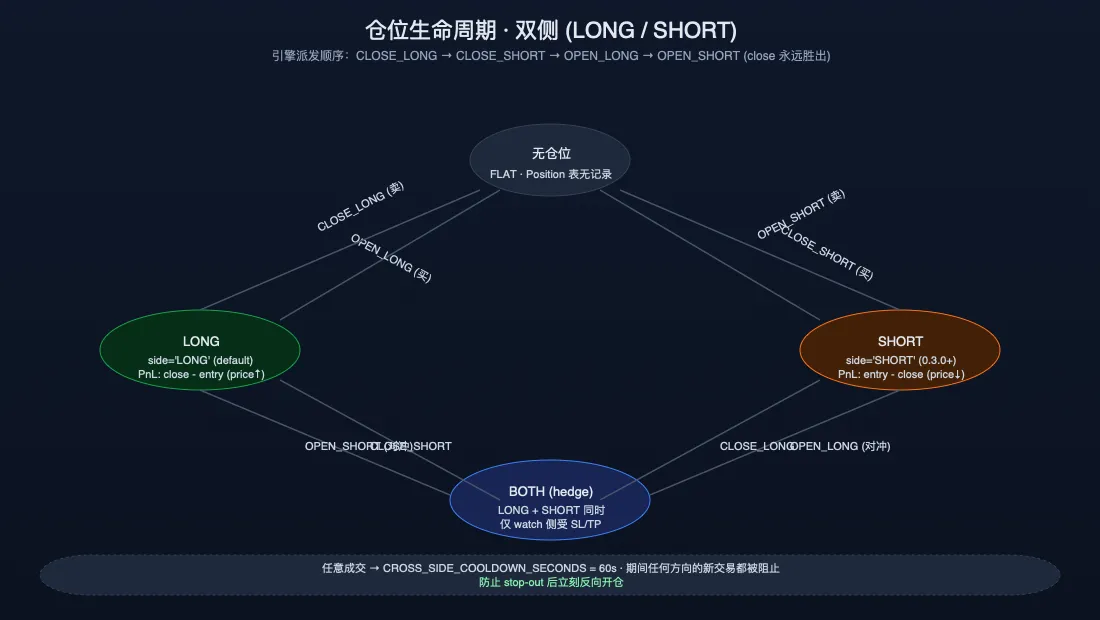
PnL must be calculated per side:
- LONG profit =
closePrice - averagePrice - SHORT profit =
averagePrice - closePrice
Each side is aggregated independently into ProfitRecord; the frontend summarizes by side.
6. Automatic error remediation
If ccxt throws when placing an order (e.g. wrong Passphrase, IP not whitelisted, insufficient permissions), the system does not just give you a red log line. It:
- In
engine.ts, classifies the error vianormalizeExchangeErrorinto anExchangeErrorCode - Writes the code to
StrategyEventLog.remediationCode - SSE pushes to
StrategyTerminal - Terminal detects it and
dispatchEvent('qt:open-settings') Sidebarhears the event, auto-opens the Configure API Keys modal
This all happens within the same tick as the failure — you don't need to dig through logs to find the cause.
7. Pre-live checklist
- [ ] Strategy has been running on Paper for ≥ 1 week
- [ ] Tested across at least 2 market regimes (range + trending)
- [ ]
/riskhas max-drawdown set (e.g. 10% triggers auto-stop) - [ ]
/backtestrun for 30+ days with reasonable Sharpe / win rate - [ ] OKX API Key ticks
Read+Trade, NOTWithdraw - [ ] Test connection shows "Connection OK"
- [ ] Not on public Wi-Fi when saving the Key
- [ ] You know where the Panic button is in the Sidebar
8. FAQ
Q: Live is doing well — can I add more capital?
A: Adjust tradeAmount in /risk. But be aware of capacity constraints — adding capital often degrades win rate.
Q: The system checks every 30s — isn't that too slow?
A: That's the point. 30s aligns with 1m candles. For 5m+ candles, increase the timer interval (saves CPU).
Q: I changed strategy parameters — do they take effect immediately?
A: Next tick. But you have to manually restart a stopped strategy.
Q: Can multiple strategies run simultaneously?
A: Yes. FREE tier: 10. PRO: 50. WHALE: 200 (as of 2026-07-21, may adjust).
Q: What if the server crashes?
A: systemd auto-restarts. Running strategies may miss a few ticks — executionLock watchdog + in-process Set prevents duplicate execution.